Airbnb Bookings Diagnostic
Why is my Airbnb not getting bookings?
AuthorRyan Prescott, Contributing writer
How to Diagnose Why Your Airbnb Isn’t Getting Bookings in One Evening… Without Guessing with a Price Cut
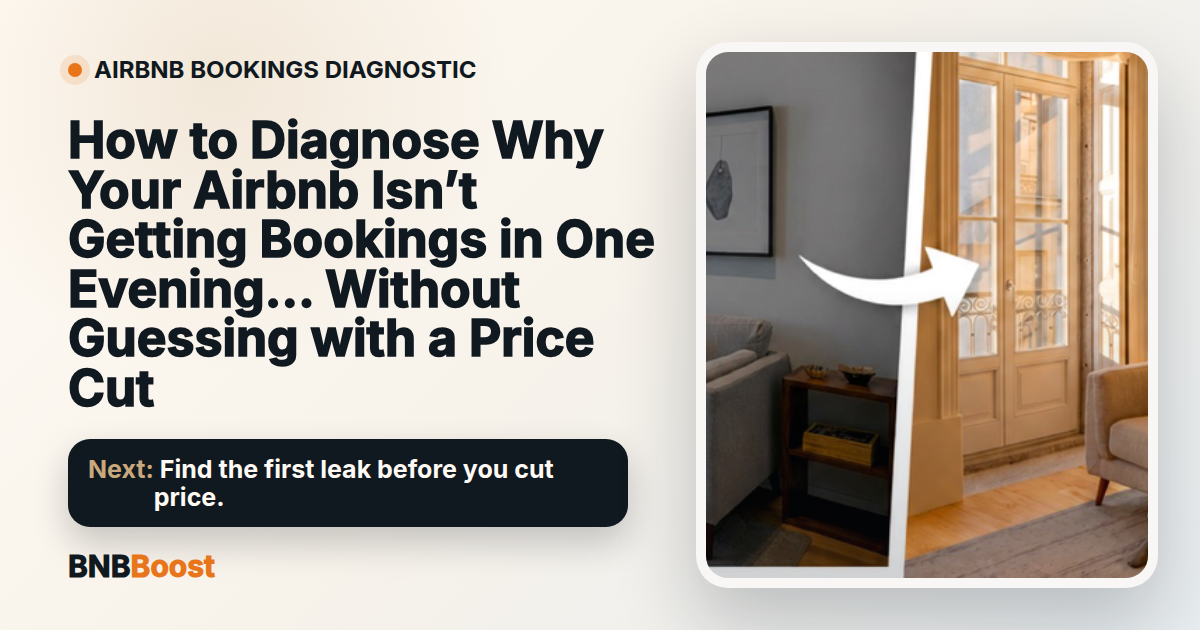
You open Airbnb. The calendar is empty. The competing place down the street is booked solid. Your first instinct is to lower the price. Stop. Lowering price is the most expensive guess you can make, because it trains every future guest to see your listing as cheap, and it almost never fixes the real reason bookings stalled.
Slow bookings often come from one of five problems, and price is not always the first one. Work through this list in order. The first "yes" is the place to start.
1. Your cover photo is losing the scroll
Guests do not read titles. They scroll through a wall of cover photos and tap the ones that look bright, warm, and lived-in. If your cover photo is dim, color-cast blue, shot at a weird angle, or showing the worst-lit corner of your best room. You are losing the click before anyone reads a single word about your place.
How to test it in 60 seconds: open Airbnb on your phone, search your city, and scroll past your own listing in the results. Did your eye stop on it? Or did you scroll past your own place? If you scrolled past it, every guest is doing the same thing. Fix the cover photo before you touch anything else.
2. Your first 3 photos do not match the cover
Even when guests tap in, they decide next whether photos 2 and 3 keep the promise the cover made. If your cover is a bright, sunset-hour living room and photo 2 is a cluttered kitchen counter or a dark hallway, the guest backs out. The fix is brutal but simple: re-order your gallery so the three strongest photos lead. Bedroom, main gathering space, and either the pool, view, or balcony, in that order, works for most listings.
3. You are buried in search and you do not know it
Airbnb does not show every listing to every guest. New listings, listings with weak click-through-rate, and listings that have not been edited in months get pushed down. If your bookings dropped suddenly with no other change, this is often the cause. Symptoms: your views in the host dashboard dropped before your bookings did, and you stopped getting saves and inquiries.
When views drop, refresh what guests see: edit the title and swap photo order. Turn on Instant Book if you can, and answer inquiries quickly.
4. Your title and first review snippet are working against you
On the search results page, guests see three things: cover photo, title, and the rating + review snippet. If your title is generic ("Cozy 2BR near downtown"), you are wasting prime selling space. A working title names a hook + a benefit + a proof point, for example, "Walk to South Beach • Pool • 5★ Hosts." If your most recent reviews lead with a complaint about cleanliness, noise, or a broken amenity, that snippet is killing trust before guests even open your listing.
5. Your description does not answer the trip question
Guests do not book a property. They book a trip. If your description opens with "Welcome to our beautifully appointed home", you are talking about you, not their trip. Open with where the place fits the guest: "Two blocks from the beach, perfect for a long weekend with friends. Sleeps 6, with a heated pool for the off-season." If your description does not answer "what kind of trip is this place built for," guests assume it is not built for theirs.
The order matters
Fix in this order: cover photo → first 3 photos → title → description → search-rank signals (instant book, response time, listing edit). Reviews are the slowest lever, you cannot fix bad reviews fast, you can only out-stack them with new five-star stays. That is why presentation comes first: better photos and copy mean better guests, and better guests mean better reviews.
When to actually lower price
After all five fixes are in place, give it two weeks. If views climb but bookings still do not, then price may be the issue, and now you know it is the issue, instead of guessing. Check the cover photo and the description before you assume you have to drop price.
The fastest way to find your specific leak
Reading a checklist and applying it to your own listing is hard, because you stop seeing your own photos clearly after the tenth time you look at them. That is why we built the free Listing Score: paste your Airbnb URL, and we score your first impression, search visibility, amenities, copy, and review signals in about 30 seconds. It tells you which of the five problems above is actually costing you bookings, so you fix the one that matters first.
FAQ
Why did my Airbnb suddenly stop getting bookings?
A sudden drop can be search visibility, not only price. Check your views in the host dashboard. If views dropped before bookings did, start there. Refresh the listing by editing the title and reordering photos, turn on Instant Book if you can, and answer inquiries quickly.
Should I lower my Airbnb price if I am not getting bookings?
Not first. Lowering price trains guests to see your listing as cheap and rarely fixes the real problem. Fix your cover photo, first 3 photos, title, and description first. Only consider a price drop after two weeks of better presentation has not moved bookings.
How important is the Airbnb cover photo?
The cover photo decides whether anyone clicks in at all. Guests scroll a wall of thumbnails and only tap the ones that look bright and inviting. A weak cover photo loses the booking before a guest reads a single word about your place.
How long does it take to fix an Airbnb listing?
Photo and copy fixes take a few hours and start working within days. Search-rank recovery takes 1–2 weeks. Review-driven trust takes longer because you need new five-star stays to out-stack any older bad reviews.
How do I know what is wrong with my Airbnb listing?
Run a free Listing Score at bnbboost.ai/listing-score. Paste your Airbnb URL and the tool scores your first impression, search visibility, amenities, copy, and review signals so you know which fix matters most.
Paste your Airbnb URL and see exactly which leak is costing you bookings, before you touch your nightly rate.