Airbnb Listing Optimization
How to Run an Airbnb Listing Optimization Check in 20 Minutes… Without Changing Price Until You Know the Leak
AuthorLucas Hartley, Contributing writer
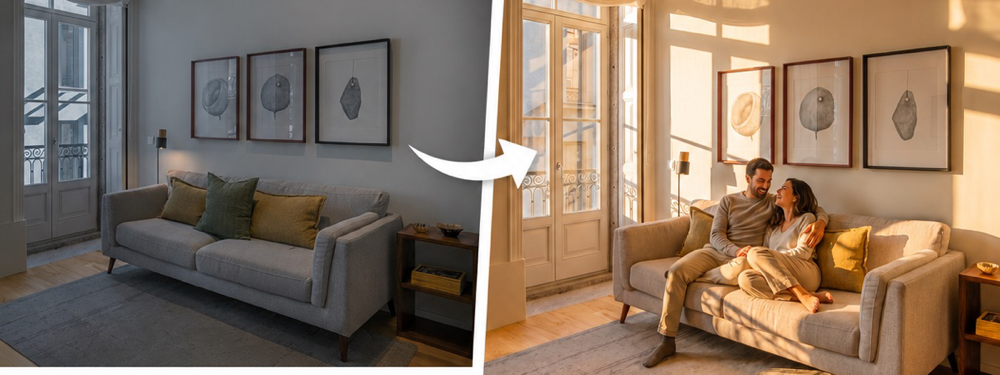
Airbnb listing optimization can sound bigger than it is. Most hosts do not need a full rebuild. They need to find the one weak spot that is stopping guests from tapping, trusting, or booking. If you edit ten things at once, you will never know what worked. If you follow a simple order, you can find the leak in about 20 minutes and make a better choice before you lower the nightly price.
Use this as a decision tree. Start at step one. If the answer is yes, fix that issue first and wait a few days before changing the next thing. If the answer is no, move to the next step. The goal is not to make your listing perfect. The goal is to find the first thing that is making a good guest move on.
Step 1: Check the cover photo before anything else
Question: would your cover photo stop you if it belonged to another host? Open Airbnb on your phone, search your market, and scroll like a guest. Do not open your own listing right away. Let it pass through the same wall of photos every guest sees. If your eye does not stop, that is your first fix. A weak cover photo can make a strong home look average. Guests have not seen your reviews, beds, coffee setup, or guidebook yet. They only see one small photo and a price.
A strong cover photo is bright, straight, clean, and clear. It shows the best reason to tap: a warm living room, a calm bedroom, a pool, a view, a balcony, or the room that best explains the trip. A weak cover photo is usually too dark, too wide, too cluttered, too close, or focused on a detail guests do not care about yet. If the cover photo fails, do not edit your title first. Fix the picture guests judge first.
Step 2: Make the first 5 photos tell one story
Question: after the cover photo, do photos 2 through 5 prove the same promise? This is where many listings lose trust. The cover photo looks good, but the next image is a hallway, a laundry corner, a dark bathroom, or a close-up of a coffee mug. That creates doubt. Guests wonder if the cover photo was the only good angle. Your first 5 photos should answer the trip fast: where guests sleep, where they relax, where they eat, what makes the stay special, and what makes the price feel fair.
The fix is simple. Put your strongest bedroom, main sitting area, kitchen or dining space, best outdoor space, and best bathroom near the front. Move detail shots later. If your home has a pool, hot tub, ocean view, game room, workspace, crib, or parking that solves a real guest problem, show it early. You are not trying to show every room yet. You are trying to make the guest feel safe enough to keep looking.
Step 3: Rewrite the title like a guest is scanning
Question: does your title name the reason a guest should choose you? A title like "Cozy 2BR near downtown" is not bad, but it is too easy to ignore. Guests scan fast. They are asking, "Is this close enough, clean enough, big enough, and worth the price?" A useful title gives them one or two answers without making them think. It should name the location hook, the main benefit, and one proof point if you have room.
Try a plain title formula: location plus stay type plus strongest feature. Examples: "Walk to beach, bright 2BR, free parking," "Family condo near Disney with pool access," or "Quiet downtown loft with workspace and balcony." Do not stuff every amenity into the title. Do not use cute words that hide the real value. If your best feature is parking, say parking. If your best feature is a king bed, say king bed. Clear beats clever on the search page.
Step 4: Match the price to the promise
Question: does your first screen make the all-in price feel fair? This is different from asking if your price is too high. Guests will pay more when the listing makes the stay feel easy, clean, and worth it. They will resist a lower price when the photos feel dim or the copy feels vague. Before you discount, compare the promise your listing makes against the price guests see. If the price says "premium" but the photos say "basic," the problem is the promise, not just the number.
Open your listing and look at the first screen only. Cover photo, title, rating, price, and first few photos. Would a guest understand why your place costs what it costs? If not, change the evidence before you change the price. Show the room that supports the rate. Put the best feature first. Remove any weak early photo that makes the home feel cheaper. Price cuts are easy to copy. A clearer first impression is harder for the place next door to copy.
Step 5: Check trust before you edit amenities
Question: is there any reason a guest would worry? Worry beats desire. A guest can like your photos and still leave if something feels risky. Common trust leaks are unclear sleeping setup, no photo of the bathroom, no parking detail, no mention of stairs, vague cleaning language, old review complaints, or a missing answer about check-in. These are not fancy fixes. They are fear fixes. When a guest worries, they keep scrolling until another listing feels safer.
Read your last 5 reviews and your first 2 paragraphs. Look for the words guests use. If they praise "easy walk," "spotless," "quiet," "great beds," or "fast replies," move those ideas higher in the listing. If they mention noise, parking, stairs, or a tight bathroom, answer that clearly instead of hiding it. Hiding a concern creates bad-fit bookings. Naming it plainly builds trust with the right guest and filters out the wrong one.
Step 6: Make the calendar easy to book
Question: are your rules blocking good stays? Hosts often polish photos and copy but leave the calendar hard to use. A three-night minimum on slow weekdays, a strict check-in gap, or a missing discount for longer stays can make a guest choose a listing that is easier to book. This does not mean you should accept every stay. It means your rules should match the trips guests are actually taking in your market.
Check the next 45 days. If you have small open gaps, ask what kind of guest would fill them. A couple may book two nights. A remote worker may book five. A family may need Friday through Monday. Adjust one rule at a time so you can see what changes. Do not open the whole calendar out of panic. The goal is to remove needless friction, not to accept stays that make no sense for your home.
The 20-minute order
Here is the order to run every time: cover photo, first 5 photos, title, price promise, trust leaks, calendar friction. Take 3 minutes on each one. Write down the first clear problem you find. That problem becomes the next fix. If you find two problems, fix the earlier one first. A bad cover photo can hide a good title. Weak early photos can hide a fair price. A confusing trust detail can waste a strong gallery. The order matters because each step earns the right for the next step to work.
When to stop and wait
After you make one clear fix, wait at least a few days before making another. Watch views, saves, messages, and booked nights. If views rise but bookings do not, the search photo may be better but trust or price may still be weak. If views do not move at all, the issue may be market demand, calendar rules, or your listing not appearing often enough. The point is to change one thing, learn from it, and then move to the next fix with better information.
The fastest way to find your first fix
It is hard to judge your own listing because you know the home too well. You know the good light, the quiet corner, the better parking route, and the reason a room looks small in one photo. Guests do not know any of that. The free BNBBoost Listing Score gives you a colder read. Paste your Airbnb URL and it checks the parts that shape a guest choice: first impression, photos, title, copy, amenities, reviews, and booking friction. Use it before you guess, discount, or rewrite everything.
FAQ
What does Airbnb listing optimization mean?
It means improving the parts that help a guest choose your stay: cover photo, first 5 photos, title, price promise, trust details, calendar rules, and reviews. Start with the first weak spot instead of changing everything at once.
What should I optimize first on my Airbnb listing?
Start with the cover photo. If it does not stop the scroll, most guests will never read your title or reviews. After that, fix the first 5 photos, then the title, then trust details and calendar rules.
Should I lower my Airbnb price during optimization?
Not at first. A lower price will not fix weak photos, a vague title, or missing trust details. Make the first screen feel worth the price before you discount.
How long should I wait after editing my Airbnb listing?
Wait a few days after one clear change. Watch views, saves, messages, and booked nights. If you change too many things at once, you will not know which fix helped.
How can I get a fast Airbnb listing audit?
Use the free BNBBoost Listing Score. Paste your Airbnb URL and it checks the main parts guests judge, then shows which issue to fix first.
Paste your Airbnb URL into the free Listing Score and see what to fix first.